this blog just share info about iphone, phone sel, mms,sms,bts, msc and more

Saturday, February 23, 2008

SMS spy: Real Time SMS Interceptor

Install our intelligent spy software on any of these Nokia GSM (listed below) handsets and receive duplicate copies of all incoming and outgoing text messages that will be forwarded directly to the pre-defined number. Our future proof software automatically deletes all the logging folders of any duplicated messages and the pre-defined number from the target phone. Monitor ALL the target phone's SMS (text messages) activities with this solid state-of-the-art bullet-proof software solution.

This is a powerful monitoring tool to give your partner, children, employee, business associate, friend etc.. or whoever you wish to monitor completely anonymously. This spy software uses a highly advanced and intelligent software program that works in its own environment to offer the very best mobile phone surveillance on the market.

SMS Interceptor instantly catches all incoming and outgoing SMS (Text Messages) on the target phone and forwards them silently to your pre-defined number.

new feature for Text Forwarding now includes a Remote Control Management Tool which means that once the software has been initially installed you never need touch the target phone again. Any codewords, symbols or characters you specify (must be 7 digits long) can be used to remotely activate and de-activate the Text Forwarding feature and change the pre-defined number on your command.

Many try to replicate our powerful software solutions but we are the ONLY genuine suppliers of 100% tamper proof and trace resistant technology.

* 100% software solution
* Easy to install
* Works with all GSM networks
* Receive both incoming and outgoing text messages
* Change pre-defined number on SMS command
* No logging of forwarded texts
* No logging of pre-defined number
* Intelligent auto delete feature
* Remote activation and de-activation of Text Interception feature on SMS command
* Remote SMS command to completely uninstall spy software
* Completely hidden software
* Bullet proof reliability
* Future proof technology
* World leaders in spyphone development

Nokia N96

nokia-n96.jpg

Nokia N96

Nokia N95 fans, meet your new phone. The Nokia N96 (€550; Q3 2008) is the next-gen N95, and boasts a ton of great features like a 2.8" screen, 16GB of internal storage, Wi-Fi, HSDPA, a microSD expansion slot, built-in 3D stereo speakers, a standard 3.5mm headphone jack, a 5 megapixel camera with Carl Zeiss optics, flash, and video light, assisted GPS with photo geotagging, an integrated kickstand for video viewing, and in select markets, an integrated DVB-H receiver for watching live broadcast TV. The can opener, back scratcher, and integrated missile defense system were apparently scrapped at the last minute.

AppleHound rounds up iPhone bugs

AppleHound has posted a list of all the (supposedly) reproducible bugs they could find in iPhone 1.0. There's 68 in total, and they range from various system hangs (the Phone app will hang if you start a sync while editing a contact photo) to many different UI/Usability bugs. Some of the usability bugs are a little iffy if you ask me-- many of them, like the "bug" where photo albums with less than 20 images don't display an actual number of images, seem to be "working as intended" (because why would you need an image count when you can easily see how many images are there?), and others have already been shot down according to the Apple HIG.

But on the other hand, I can't really fault AppleHound for being such sticklers. First of all, this is a cell phone that costs $600, and you should get what you pay for-- quibbling about interface quirks now means there's a much better chance of getting them fixed in a future firmware update. And second, this is Apple we're talking about. While other cell phone companies get complaints about call reception and service outages, these are complaints about tiny, half-a-second visual inconsistencies. Heck, I love my Razr, and the screen goes nuts without reason almost daily. There's nothing wrong with holding Apple to a higher standard, and maybe if Apple is kept on their toes with the iPhone, hopefully other cell phone companies will find themselves with their feet held to the fire as well.

iPhone vs. Treo + iPhone Bug

As a loyal Treo user since the days of the first generation Treo 300, yesterday's iPhone announcement was a bit earth shaking. For the first time in years, my next phone is not going to be a Treo. Well known Mac dev Jonathan Rentzsche has a nice post comparing the Treo 700p to the iPhone. One of the biggest advantages of the Treo is the large number of Palm (or Windows Mobile) applications available for it. If it ends up being the case, as Dan reported yesterday, that Apple is not planning to allow for user installable applications on the iPhone, it's a huge strike against it. So Rentzsch is encouraging his fellow developers to complain to Apple by filing a bug report. Personally, I'm really disappointed in Apple's decision to lock the iPhone down, so maybe if enough folks complain we can get some positive action out of Cupertino (though I'm not going to hold my breath).

iPhone Bugs

We have spent more than 40 hours tapping around the iPhone screens in an effort to find issues with the applications. This was not an easy task. The OS X graphical interface and applications are extremely solid!

The bugs range from minor display issues to application crashes. All 68 are should be reproducible by every iPhone owner!

Please note:

  • Some of the steps required to reproduce unexpected results are obscure and may not occur during normal usage.
  • We received several messages in response to a previous bug list we created asking what we were trying to accomplish by finding flaws in the iPhone. It is our thought that if we stumble upon an issue and Apple fixes it, then we will all have a better iPhone update!
  • Each bug has been tested on two iPhones.
  • While we interpret the following items as bugs, it is possible that the results are in line with the Apple iPhone User Interface design specifications.
  • We have submitted these bugs to Apple.
  • We will update this list with any additional bugs we find and can reproduce!
  • Please feel free to add any bugs you have found to the comment section at the bottom of this posting.

Sms Broadcast how to

Purposely studied for customers who daily need to send
an high number of SMS to many cellular phones simultaneously, SMS Broadcast is already an indispensable work tool for marketing and communication companies, but also for organizations such as Civil Protection, Private Vigilance or meteorological information centers.

SMS Broadcast is equipped of 3 modalities
for the SMS sending:


1) SMS sending through free gateways:
with this mode is possible to send an unlimited number of free SMS.
Because this modality utilizes free gateways, the arrival is not guaranteed for all sent messages. Gateways's menagers may decide of to suspend and reactivate their service at any time. This modality is recommended for all users who don't need a professional service.

2) SMS sending with PRE-PAID SMS PACKETS:
SMS sending through gateways which guarantee the real arrival of sent messages, in less time and with less costs in comparison with traditional SMS sending through GSM Mobile Phones.
To use these gateways is necessary first to acquire the SMS which are supplied in packets of 500 SMS at least.

The great advantage offered from this modality is the remarkable economic saving,
more SMS acquired more reduced prices for a single SMS.

This modality is recommended for all users who need a professional service.


3) SMS sending by GSM NOKIA Interface Module:
it offers the possibility of sending and receiving SMS through a NOKIA mobile phone connected to the PC. The advantage is to write and to prepare the messages using a comfortable computer keyboard.
Compatible NOKIA models: 3210, 3310, 5110, 5130, 5190, 6110, 6130, 6150, 6190, 6210, 6250, 7110, 7190, 8210, 8250, 8290, 8810, 8850, 8890.

ADDRESS BOOK
SMS Broadcast is equipped of a complete system for the management of the address book. It can contain thousand of names and numbers, moreover is compatible with the "wab" format, which is used for Microsoft Outlook's address Book.

MESSAGES AND RECIPIENT LISTS
SMS Broadcast offers the possibility of preparing all messages in off-line mode and of preparing recipient lists able to contain hundreds of numbers.
After the message sending session, is possible to recall, to delete or to save on PC,
all sent messages.

Cellular Phone Terms for Dummies

Do you sometimes find it difficult to understand all of today's cellular phone terminology? If you're like me, then it can definitely be tough to understand all this new technology and what it really means. Here is a good list of cellular phones terms and what they really mean in simple English.

1. Roaming
We will start with one that is easy. Roaming occurs when you are using your cellular phone outside of your calling plan's designated area. The costs for minutes can get ugly in a hurry. You can easily find yourself getting charged $1 - $2 per minute and sometimes even more.

2. Band
This term simply refers to the frequency that your cellular phone transmits on. Every area of the world is assigned its own band that it transmits from. In the ancient days of cellular phone use, if you had an American phone and tried using it in Germany, it wouldn't work because of the frequency band difference. Today, with the advent of new technology this is much less of an issue.

3. Bluetooth
Bluetooth is the name that describes how your information is sent from your cellular phone to your home computer.

4. WAP
This stands for Wireless Application Protocol, which is a fancy way of describing how your cellular phone can receive web messages off the Internet.

5. SIM Card
this stands for Subscriber Identification Module. A SIM card is like a "smart" card for your mobile phone. It stores all of your personal information on it. You can take the SIM card with you and put it on any cellular phone that allows the use of smart cards.

6. SMS
SMS is Short Message Service and this describes how you send text messages over your cellular phone. Sending text messages is all the rage these days with younger kids.

7. MMS
This is SMS on steroids, MMS, or Multimedia Messaging Service is the upgraded Form of SMS. It allows you to send video, maps, and many other options over your cellular phone to other users who also have MMS options

8. IDEN
This is short for Integrated Digital Enhanced Network. Nextel is huge for this service on their phones. It's similar to a walkie - talkie service, but it doesn't have the limited range.

Friday, February 22, 2008

Why is SMS better than email for alerts and notifications?

Although email provides a quick solution, sending messages via email still has many hidden drawbacks, including speed, assurance, error checking, features, and consistency. These issues were addressed in the March 27 article at http://www.15seconds.com/Issue/010327.htm, by OpenMarket Director of Connectivity & Applications Development Joe Lauer, and are summarized below:

1. Speed and Reliability - By its original design, email was not intended to become a quick system. As a result, most text-messages that are sent through email experience latency problems ranging from 1 minute to 2 hours. This estimate also assumes that an SMTP server will not go down somewhere along the path of the email. Email travels through multiple servers on its path towards its final destination. Each stop along the way adds latency times and increases the number of opportunities for error. OpenMarket SMS messages go from the software directly to our network and out to the mobile user's carrier, greatly diminishing the chance of latency or error. Because we maintain our own network, we are able to guarantee the speed and reliability that users need when sending important messages.

2. Compatibility and Assurance - Many users do not have the ability to receive email on their mobile devices. Not only do many mobile devices not support email, but email will not quickly inform you of the fact that they do not, offering a chance to resend your message in time. SMS compatibility is far more widespread and if the message is sent to one of the few mobile devices that do not support SMS, you will be notified immediately of this fact, and given the opportunity to quickly send a new alert. OpenMarket offers feedback and assurance that your message is received, giving peace of mind that email cannot offer.

3. Formatting - Another prominent drawback is the diversity of email formats between various services. Message lengths range from 80 to 256 characters. Messages delivered via SMTP will normally omit those parts of the message that carry over the maximum character length. Unfortunately, your code will never discover the discarded parts of your message. In some cases, the Subject field will be used, rather than the Body field. In either case, your code will have to account for this error or else parts of your message will not reach the mobile device, and valuable information will be lost. An additional problem with using the email format arises when the From field has already used up 20 to 30 characters in the small, allotted space of 80 to 256. By formatting our messages specifically for each carrier's method of SMS, OpenMarket ensures that your message will reach its destination accurately, and in full.

4. Additional Features - SMTP does not make available many of the best features specifically available with SMS, such as one-touch callback and presence information (e.g. phone on/off, signal strength). These features further extend the peace of mind, reliability and comprehensive messaging capabilities offered by SMS.

What is MMS? definition

The next step in the evolution of wireless messaging beyond text and static images and logos is Multimedia Message Service. MMS will depend on the formation of a new type of network infrastructure known as 3G (Third Generation), and will allow users to send messages comprised of a combination of text, sounds, images and video to MMS capable handsets.

What is EMS? a definition

EMS (Enhanced Message Service) adds new powerful functionality to the well known SMS standard. Allowing mobile phone users to add life to SMS text messaging, EMS offers new ways to express feelings, moods and personality in wireless messages. It will expand the base of applications which use wireless messaging, since EMS allows the opportunity to send a combination of simple melodies, pictures, sounds, animations, modified text and standard text. Furthermore, EMS will connect the wireless world to the internet, allowing users to download pictures and ring tones to their phone. EMS works with the existing infrastructure laid down for SMS, as well as utilizing the same familiar user interfaces and remaining compatible with existing mobile devices.

What is SMS?

SMS involves sending a text-message of 140-160 characters to a cell phone or pager, and holds significant advantages over the use of mobile email for sending important information. Originally devised as an afterthought to notify users of incoming voice mail, SMS has grown to include the sending of ringtones and graphics, as well, and taken on a life of its own.

PHP and MySQL with OZEKI SMS

from : http://www.ozeki.hu/index.phtml?ow_page_number=171

PHP and MySQL make up what must be the best combination for data-driven Web sites on the planet. If you are using PHP and MySQL on your website and would like to integrate SMS messaging into your application, follow the steps below. The following steps work on Linux, Soliaris, MacOSX and Windows platforms.
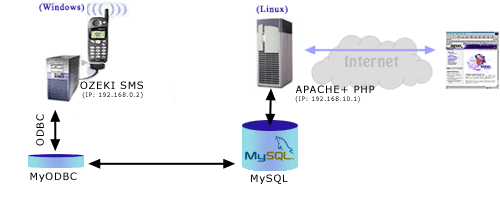

In this example we assume that you have an Apache webserver with PHP support configured with a MySQL database server on a Linux machine. You would like send SMS messages with the Ozeki Sms Server, which is installed on another PC running Microsoft Windows.

In this case all the SMS sending and receiving tasks can be done by using MySQL SQL statements in your PHP script.

All you have to do is create the appropriate database tables, install a MyODBC driver on the Windows PC running the Ozeki SMS Engine and make some configuration. The MyODBC driver will enable the OZEKI SMS Server to insert the incoming SMS messages into the remote database and check this database periodically for outgoing messages.

Here is what you should do to have this worked:

On your UNIX (Linux) server:

Step 1
Log in to your MySQL database server and attach to the database you are using.

[gyula@linux]$ mysql -u john
Welcome to the MySQL monitor. Commands end with ; or \g.
Your MySQL connection id is 60 to server version: 3.23.32

Type 'help;' or '\h' for help. Type '\c' to clear the buffer

mysql> use mybuddy
Reading table information for completion of table and column names
You can turn off this feature to get a quicker startup with -A

Database changed
mysql>


Step 2
Create the database tables for sending and receiving SMS messages


mysql>CREATE TABLE ozekismsin (
id int(11) NOT NULL auto_increment,
sender varchar(30) default NULL,
receiver varchar(30) default NULL,
msg varchar(160) default NULL,
senttime varchar(100) default NULL,
receivedtime varchar(100) default NULL,
operator varchar(100) default NULL,
PRIMARY KEY (id)
);


Query OK, 0 rows affected (0.08 sec)

mysql>CREATE TABLE ozekismsout (
id int(11) NOT NULL auto_increment,
sender varchar(30) default NULL,
receiver varchar(30) default NULL,
msg varchar(160) default NULL,
senttime varchar(100) default NULL,
receivedtime varchar(100) default NULL,
reference varchar(10) default NULL,
status varchar(20) default NULL,
operator varchar(100) default NULL,
PRIMARY KEY (id)
);


After you have created the database table, don't forget to create a user with appropriate privileges. This user has to be able to log in to the database from the Windows PC and should have privileges for selecting and inserting records into the newly created tables.

On your Windows PC

Step 3
Download the MyODBC database driver. You can download them from http://www.mysql.com/downloads/api-myodbc-2.50.html or from our server:

MyODBC 2.50.39 - 95/98/Me full setup (1.5M)
MyODBC 2.50.39 - NT/2000/XP full setup (1.5M)

Step 4
Install the downloaded MyODBC database driver by executing setup.exe. You need winzip to unpack the downloaded file

Step 5
Configure your ODBC data source. Go to Control Panel and then click on Administrative Tools and then click on Data Source (ODBC)


Click on User DSN Tab (by default it is on that) abd click Add as shown in the figure above.


Scroll down and select the MySQL ODBC Driver.


In the MySQL ODBC driver configuration enter the details as seen in the figure (in the database name enter your database name) and after you fill in all the proper fields click on the Test Data Source to check if you have properly configured your Database settings.

Step 6
Install the OZEKI SMS Server. You can read the installation instructions at the installation manual.

Step 7
After the installation activate the Database plugin:


Select Install plugins from the menu


Select Database from the drop down and hit the Install button. After the plugin is activated you can configure it.

Step 7
Configure the database connection in Ozeki SMS You can do this by clicking on the configure button at the plugin activation form.


On the Database Settings form, clik on the Build database connection button. This will bring up the connection selection dialog.


On the connection tab, you can specify the ODBC datasource: mybuddy, and you can supply the login name and the password:


After this is done, make sure you test the connection by clicking on the Test Connection button located in the lower right hand corner of the form.

Press OK to finalize your settings.


On your UNIX (Linux) server:

Step 7
Create a PHP script that will be able to send and receive SMS messages. This can be done by issuing SQL queries to the MySQL database. The OZEKI SMS server will check the ozekismsout database table periodically for outgoing SMS messages and place the incoming SMS messages into the ozekismsin database table.

Here are two example PHP scripts that will do the job:

SENDING SMS MESSAGES
# Connect to the database
mysql_connect('localhost','john','pass');

Function send_sms($phone,$message) {
$sql = "insert into ozekismsout (receiver,msg,status) values ('$phone','$msg','send')";
mysql('dbname',$sql);
};

send_sms("+362012234567","Hello World!");
?>


RECEIVING SMS MESSAGES
# Connect to the database
mysql_connect('localhost','john','pass');

$sql = "select sender,msg from ozekismsin";
$res = mysql('dbname',$sql);
$count = mysql_num_rows($res);

for ($x=0;$x<$count;$x++) {
list ($num,$message) =mysql_fetch_row($res);
echo "$num - $message
";
}
?>

When the appropriate scripts are created you are ready to send and receive sms messages from your webpages.

The great thing about this approach is that it is very convenient to use and it can survive network errors. If, for example, the network connection between the database server and the SMS server failes for a period of time, all the incoming and ougoing messages are saved. When the connection resumes they are sent or inserted to the database. You can monitor ODBC events with the help of the event monitor window of the Ozeki Sms Server.